Showing posts with label 7. Show all posts

Friday, October 17, 2014

Alcatel One Touch Fire 7 And Specifications

Alcatel One Touch Fire 7 has a 7-inch diagonal screen size resolution 540 × 960 capacitive touch screen with support. The device is powered by a dual core processor with a clock speed of 1.2GHz and backed by 2GB of RAM storage and 4GB of RAM and you can add up to 32GB of external storage.

Alcatel One Touch Fire 7 has dual camera, front and rear cameras both have a VGA resolution 640x480 pixels. Firefox OS is a mobile operating system based on Linux and Mozilla Developers, which has been built using HTML 5 technology. Other partners that helped build Mozilla and Firefox OS in adopting their mobile devices are LG, ZTE, Alcatel and Geeksphone.


Read more »

Sunday, October 5, 2014

PixCom AndroTab Tri G 7 inch price and specifications

PixCom AndroTab Tri G 7 inch price and specifications | Pixcom Mobile is ready to dominate the market the cheapest android tablet with enough quality to compete. The tablet is already using Android 4.0 Ice Cream Sandwich as well as the richer interfaces with sophisticated screen technology TFT capacitive 5 point which has a size of 7 inches and a resolution supported by a capacity of 480 × 800 pixels and a 1.2GHz Qualcomm Snapdragon processor chip are more stable with 512MB RAM support and internal memory that can boost the performance of 4GB plus option which gives the opportunity to upgrade capacity using microSD cards up to 32GB capacity.

PixCom AndroTab Tri G also uses network access that supports 3G makes the tablet has dimensions of 199.6 x 123.5 x body 11.2 mm can provide data access requirements are very satisfying for you as a user. Furthermore you will be pampered with a pretty good camera for a tablet PC 2 MP on the back and on the front there is also a VGA-quality camera even with the front, Pixcom AndroTab Tri G will be fun to explore other features support for quite evocative as such as built-in Microphone, 3.5 mm Earphone Speaker, Wi-Fi, Bluetooth, GPS and Rechargeable lithium-ion battery 2300 mAh 3.7V


PixCom specifications AndroTab Tri G 7 inches:

  • Dimensions: 199.6 x 123.5 x 11.2 mm
  • Processor: 1.2 GHz Qualcomm Snapdragon
  • Memory: Internal 4GB, 512 MB RAM, 32 GB microSD.
  • OS: Android 4.0 Ice Cream Sandwich
  • Screen: 7 inch with 5 point capacitive touch screen, resolution 480 × 800 pixels
  • Camera: Dual camera 2 MP (main) + VGA (front)
  • Audio: Built-in Microphone, 3.5 mm Earphone Speaker
  • Network: 3G Network
  • Wireless: Wi-Fi, Bluetooth, GPS
  • Battery: Rechargeable lithium-ion 3.7V 2300 mAh
Priced around U.S. $90.
Read more »

Thursday, October 2, 2014

iOS 7 Beta 4 has been released 2 More Beta Go to Final iOS 7


Good news for the users of iOS 7 beta. Apple has just released iOS beta 7, the next version, the iOS7 beta 4. Operating system  iOS7 beta 4 is available to download via the iOS developer website.

In addition to passing iOS developer website, the fourth beta version of iOS 7 is also available for OTA (over the air) in a device that is running iOS 7 beta. This latest update brings a variety of the latest improvements in the stability, appearance, and some other sectors.

Interestingly, Apple is rumored to only be releasing 2 versions before releasing iOS beta 7 is officially in early September. Just wait the presence.
Read more »

Sunday, August 31, 2014

Nexus 7 or Kindle Fire Which One Should You Buy

Nexus 7
Nexus 7 and the Kindle Fire are two hot and favorable android tablets at present,and most of people cannot decide to buy which one.My suggestion is buy the Nexus 7 unless youre a huge Amazon user. Then get the Fire.

There you go. No beating around the bush. Just a simple answer. Or is it?

Lets regroup for a second and really look at the question. The Kindle Fire is Amazons $199 7-inch Android-based Kindle device. Its WiFi-only. The Nexus 7 is Googles $199 7-inch Android device. Its also WiFi-only.

Now you can see why theres some level of confusion. The two devices are the same size and the same price. There are some differences, however.

Physical device

The Kindle Fire weights 2.6 ounces more than the Nexus 7. Its 14.6 ounces, while the Nexus 7 is 12 ounces. In a handheld device, 2 ounces is something youll notice.

More to the point, the Nexus 7 is a lot more machine for your $199. Its got a much faster CPU, a graphics processor, twice the RAM of the Kindle Fire, and (for an extra fifty bucks) can store twice as much as the Kindle Fire.

On raw horsey-power, the Nexus 7 gets the win.

Android OS

Although both devices are based on Android, youd be hard-pressed to notice Android on the Kindle Fire. The Kindle Fire is a Kindle first, with Android 2.3 running underneath, hidden from view.

On the other hand, the Nexus 7 is Googles current benchmark tablet, running Android 4.1 (otherwise known as Jelly Bean).

On Android compatibility, the Nexus 7 gets the win.

Software compatibility

Heres where things start getting interesting. Youd think the Nexus 7 would run more Android apps, but because its the first Jelly Bean product in a 7-inch tablet form, many Android apps (like Instagram) wont run because they check the version number. 4.1 is higher than many apps are comfortable with.

On the other hand, the Kindle Fire runs apps primarily from the Amazon app store. While you can side-load regular Android apps, theres some hoop jumping involved.

When it comes to software compatibility, at the time of writing, neither wins the top slot. Its a draw.

Gaming

There are quite a few nice, little games for the Kindle Fire. But the Nexus 7 has a built-in Tegra 3 T30L graphics processing unit. Almost, without a doubt, and especially since the system also has twice the RAM, the Nexus 7 will be the better gaming machine.

Nexus 7 gets the win.

Security

This one is interesting. Android security is somewhat problematic, especially if you decide to download apps from secondary app stores. Apps purchased through Amazon have a much higher chance of being safe. In fact, the entire Kindle experience is tied into your Amazon account, and is secured by Amazons relatively strong attention to detail.

For security, the Kindle Fire gets the win.

Media

Heres where Amazon takes the lead from Google. Amazon has a rich media experience, and also provides a substantial library of free movies and TV shows to Prime customers. Google Play isnt nearly as good. Jason Perlow also pointed out that only actual Kindle devices (not just those devices running Kindle software, like an iPhone), can take things out from the Kindle Lending Library. So if you want to read best-sellers for free, the Fire is your best bet.

On the other hand, the Nexus 7 will play that media better, because it has substantially more power and a higher-resolution display.

Well call this a draw.

Which should you get?

Without a doubt, the Kindle Fire is a Kindle, while the Nexus 7 is an Android tablet. If you want a Kindle more than you want an Android tablet, then you might be happier with the Kindle Fire. Likewise, if you want to stay out of the morass that is the Android ecosystem and just want to stay in the welcoming, comforting arms of Amazon, youll be happier with the Kindle Fire.

Kindle FireOn the other hand, if you want a powerful, inexpensive, solidly designed pure Android tablet, the Nexus 7 is a no-brainer.

My wife and I have two iPads and two Kindle Fires at home. Im honestly thinking about selling my Kindle Fire and getting a Nexus 7 to replace it. If you do decide to sell your Kindle Fire, make sure you remember to decommission it before you sell it. Otherwise, the device has access to your entire Amazon account.

Hmmm...maybe the Kindle Fire isnt that secure, after all.

from zdnet
Read more »

Friday, August 1, 2014

Samsung Series 7 Ultra the Beautiful Ultrabook to Work


In 2013, the ultrabook parties still has not stopped. Major vendors seem still not satisfied bring portable computer that has a thin and lightweight characteristics on the market. Electronic device manufacturers from South Korea, Samsung, is a fairly diligent vendor produces the Ultrabook. the Ultrabook one of the latest series that has been present on the market is the Samsung Series 7 Ultra.

Design of Series 7 Ultra is still the same as the previous series, very unsightly. However, what about the ability of computing? Lets look at the following review.

Like the other brands ultrabook, the Samsung Series 7 Ultra thin appearance and carries a light weight. It has a thickness of 17.5 mm and weighs 1.46 kg. Her body looks gorgeous with cast aluminum casing with material type. Samsung logo printed on the back of the screen is made of polished aluminum. Silver color, or referred to Samsung as "Metal" became the main theme of this ultrabook. Logo sticker was white and gray a bit aligned.

According to the statement of the Samsung, only a few products that received the title "Premium" by Intel, of course, one of which is the Samsung Series 7 Ultra. Samsung puts all input / output ports on the right side and left ultrabook.

A row of connector on the left side is:

- 2x USB 2.0
- Card Reader
- Kensington Lock

Connector on the right side is:

- 1x USB 3.0
- 1x HDMI
- 1x VGA (adapter)
- Headphone-out jack (3.5 mm)
- Adaptor

Uniquely, still on the right, there are RJ-45 connector for wired LAN. Usually, because it comes with a thin body, the vendor provides a separate ethernet dongle.

The keyboard on the Samsung Series 7 Ultra uses chiclet design with matching buttons with the casing, making this device more beautiful when it is opened. Series of buttons is quite wide, prevent users from incorrectly ketik.Touchpad used relatively large for the size of portable computer, which is 10.7 x 7.7 cm wide. Has a width size, makes the user comfortable to move the mouse pointer. However, this measure also raises the negative side, the touchpad so often touched accidentally.

The entire surface of the touchpad is sensitive to pressure. Unfortunately, there is no separation between the left and right click buttons. Users have little to guess between the two keys. Same with a new ultrabook and a portable computer on the market, the touchpad supports multi-gesture input.

The Samsung has repeatedly called this product as a premium device. This is evidenced by features backlighting on the keyboard. Premium products usually use these features, in addition to facilitate the user when typing in low light conditions, as well as to enhance its products.

For sound system problems, Samsung handed it to JBL. The sound it produces is quite stunning.

Samsung Series 7 Ultra is equipped with a dual-core Intel Core i5-3337U-speed 1.8 GHz, 4GB of DDR3 RAM combined. This combination is more than enough to handle a wide range of usage scenarios, ranging from just running word processing, surfing the internet, to photo editing.

Run any multimedia file is not a difficult thing for this device. Full-HD movies (1080p) can be played smoothly, without any lag. The screen resolution is very supportive playback Full HD movies. Resolution reaches 1920 x 1080 pixels with 16:9 ratio. The display quality of the Samsung Series 7 Ultra looks good. Display looks bright and sunny. After further investigation, it is known that the type used is the IPS screen with 350 nit brightness level.

Ultrabook is not equipped with hard disk storage media. It was equipped with a SSD with a capacity of up to 256GB. Its capacity is not too large, but this component can help speed up the waiting time for loading applications. The section also makes boot up time is very fast. To get into the operating system, the system only takes 2 seconds only. If users want more capacity, it is recommended to use an external hard disk.

Samsung Series 7 Ultras keyboard keys are quite soft and give positive feedback that feels comfortable for typing. Unfortunately, as mentioned previously, the touchpad is large and feels a bit disturbing. Processor Intel Core i5-3337U is equipped with Intel HD 4000 graphics. The GPU is already quite strong, but Samsung still complete this ultrabook with discrete graphics in the form of the AMD Radeon 8570M.

The graphics card itself is not the type of graphics processors aimed to berain heavyweight game. Users can still use the ultrabook to play game titles that are not too heavy. Users have to do some setting changes, such as lowering the resolution and graphics detail, if you want comfortable playing.
Read more »

Sunday, July 20, 2014

How to Expand Storage of Nexus 7 and Other Android tablets

Tablets are becoming more popular these days and you can do almost everything on it. Meanwhile, with the development of technology, the good quality of entertain contents, such as photos, music, movies, and games, need much storage to keep them. In general, the storage capacity of most tablets ranges between 16GB, 32GB and 64GB. Nexus 7 offers 16GB and 32 GB options without SD card.If you want more storage, then how to do it? Indeed, there are some tips helping you increase the storage of Android tablets. Following are the details.
Android tablets-Expand storage

USB OTG Cable
The USB OTG cable is a USB cable On-The-Go,allowing the mobile device connect with other USB device such as a flash drive.This way is very easy and you just need to plug the OTG cable in the Android device and the other port of the cable connects with a flash drive or a USB drive and then you can save your content to the flash drive.That means your Android tablet is the host and the flash drive acts as your storage.

Online Storage Service
For the majority, this way is the effective and simple way to get more storage capacity with storing the files online. You can find many good online cloud storage services that offer free space for you.With the app that is provided by online cloud storage service, you can easily upload and download files directly from your tablet.

Popular online storage service: COMODO Cloud(free 5GB),SugarSync(Free 5GB), Dropbox(free 2GB),Box(free 5GB),JustCloud.

Kingston Wi-Drive
When you use the online storage service, you may need a high speed internet connection, so if you think it is hard for you, you can use Kingston Wi-Drive to extend the storage. Kingston Wi-Drive hardware is a portable USB Flash storage device that allows you to wirelessly stream digital media content (such as music, photos, videos, etc.) to your Android based tablet or smartphone, available for both Apple and Android products. It offers you three two storage capacities – 32GB, 64GB and 128G.It is an easy but perfect solution for expanding storage and you just need to connect with it use the USB cable and then you can use it.

For this way, you need a Kingston Wi-Drive hardware, Wi-Drive app, a USB cable, AC adaper, an AirPlay compatible Android device.It doesn’t support 3G,

GoFlex Satellite
Just similar as Kingston Wi-Device, GoFlex Satellite device lets you wirelessly access all your movies, photos, music and documents on your Android device. It offers a larger storage capacity than Wi-Device and it works for both your tablets and PC. Better, it comes with built-in battery backup of up to 7 hours and a single USB connection specially designed for tablets. All you need do is turn on its power and connect it with your Android tablet via the USB port or wirelessly with built-in wireless network. Then you have got an external 500GB storage capacity. You can take more than Take more than 300 HD movies with the increased storage.
Read more »

Tuesday, July 15, 2014

Micromax Funbook Talk P360 available online for INR 7 049

Micromax has released yet another Android tablet in the Indian market. The tablet, which is known as Funbook Talk P360, will be joining the company’s growing Funbook series of devices. Frankly, there is nothing exciting here. Micromax has got in to this habit of changing odd feature here and there and launching a new product every month.

The Funbook Talk P360 will be succeeding company’s previously launched Funbook Talk P350 tablet and not much has changed here. Micromax has just added 512MB of more RAM, rear camera and little more battery power. When, we are seeing full HD displays becoming the standard in smartphones and people don’t like even to see WVGA displays in budget phones, company is loading them in 7-inch tablets.  Looks like, even asking for Android 4.1 is too much for Micromax.
Anyways coming back to the news, Micromax Funbook Talk P360 is currently available on Saholic.com for INR 7,049. It runs on Android 4.0 Ice Cream Sandwich and is powered by 1GHz processor. On the imaging front, company has included 2MP rear camera and 0.3MP front camera.
In addition, the tablet also packs 1GB of RAM, 4GB of on-board storage along with microSD card slot.  In other features, you will get 2G voice-calling, 3G support via USB dongle, and 3,000 mAh battery.
Micromax Funbook Talk P360 key features:
  • 7-inch capacitive touch screen with 800x480p resolution
  • 1GHz single-core processor
  • 1GB of RAM
  • 2-megapixel rear camera
  • 0.3-megapixel front camera
  • Android 4.0.4 (Ice Cream Sandwich)
  • 4GB internal memory (2GB user memory)
  • MicroSD card slot
  • 3.5mm audio jack, FM Radio
  • 2G voice-calling (via SIM card slot)
  • Wi-Fi, Bluetooth, HDMI out
  • 3G support via USB dongle
  • 3000 mAh battery
Read more »

Saturday, July 12, 2014

Using Nexus 7 with a keyboard

nexus 7 keyboard
My Nexus 7 is almost always in my hand, surfing the web, researching articles, reading an ebook, or otherwise consuming content from the web. It is particularly useful for those purposes as I have detailed in the past. I am getting asked if the Nexus 7 would be useful for creating content with an external keyboard. My answer is absolutely not.

I have a reputation for using tablets in my work by using them with keyboards to write thousands of words. They are very good at that as my working history proves, but only to a point.

The Nexus 7 will never be good for writing as I do, even with a good external keyboard. Thats due to one factor: size. While the 7-inch display makes the Nexus 7 perfect for a portable companion, it is too limiting for use as a laptop replacement.

This limit is due to two factors, keyboard width and display size. Just like the original 7-inch netbook, the Eee PC, the Nexus 7 is too narrow to support a case with a workable keyboard. I never could type well on the Eee PC, and the same would be true for any keyboard for the Nexus 7.

The screen size is even worse for using in a laptop configuration with a keyboard. While the small display is perfect while held in the hand not too far from the eyes, its a different ballgame when propped up with a keyboard for typing. The small screen is too far from the eyes and just too darn small to be useful.

Thats why I cant see ever using the Nexus 7 as a standin for writing, even if its the only gadget in the bag. While larger tablets like the iPad work well for me for such tasks, I am not willing to use something that makes the process difficult. A tiny display would certainly do that so Ill stick to using the iPad for writing and the Nexus 7 for most everything else.

from zdnet
Read more »

Monday, July 7, 2014

CyanogenMod 7 builds for EVO 3D and HTC Sensation now online!

Now, if you have a 3.4 inch HTC Sensation and EVO 3D this is your chance to have a sneak peak of the Alphafied CM7. Last night when Keyan Mobli shout out in our Google+ stream page that the unofficial builds of CyanogenMod 7 for HTC Sensation and Evo 3D are now available. Many Evo 3D advance users hurried up flashing the builds without any hesitation . I didnt managed to deal with it yet for I was in creating the Samsung Galaxy S 2.3.5 guides. The stream page was then suddenly flooded with a lot of  feedbacks from those most fastest flashers.

CyanogenMod 7 builds for EVO 3D and HTC Sensation
According what I gathered up in some reports earlier, this build is much prettier stable. Anyway, its still easy to install this builds as just like - First time flashing CM 7 to your Sensation (or coming from another ROM)?
1. Unlock/root your device and install Clockwork Recovery via ROM Manager
2. Do a Nandroid backup!
3. WIPE
4. Install the ROM
5. Optionally install the Google Addon

So if you want to give it a try, grab it out! HTC Sensation; HTC EVO 3D; via +Keyan Mobli
Read more »

Wednesday, June 25, 2014

Nokia Lumia 720 Mobile Windows Phone 8 6 7 Camera Price and Specifications

Nokia Lumia 720 Mobile WindowsPhone8 6.7 Camera Price and Specifications | Mobile Nokia Lumia 720 comes with a stylish design, plus innovative features such as Enhanced Sunlight Readability and Super Sensitive Touch seems that existed at the previous Lumia 920. Nokia Lumia 720 is powered by a dual core 1GHz processor and 512MB of RAM. Nokia Lumia 720 is also equipped with 8GB of internal memory plus a microSD slot, NFC, WiFi, 3G HSPA +, Bluetooth, 2000mAh battery capacity, and support wireless charging.

Nokia Lumia 720 comes with a 4.3-inch touch screen with ClearBlack technology support and Gorilla Glass 2. Fingerprints are not an issue anymore because with this technology the screen is easy to clean, and also increased the visibility of a different perspective and broader. Nokia Lumia 720 using a 6.7 megapixel main camera with f/1.9 aperture and Carl Zeiss optics. Larger aperture, it means more incoming light, and with the combination of Carl Zeiss optics will produce quality pictures are more clear and bright when shooting under low light conditions. Nokia Lumia 720 is also equipped with a front camera Skype HD wide angle 1.3 megapixel.


Specifications Nokia Lumia 720:

  • Networks: GSM / EDGE: 850 (5) / 900 (8) / 1800 (3) / 1900 (2) MHz WCDMA: 850 (5) / 900 (8) / 1900 (2) / 2100 (1) MHz HSPA +: 21 Mbps (Cat 14)
  • OS: Windows Phone 8, GDR1
  • CPU: MSM8227, 1.0 GHz
  • RAM: 512 MB
  • Storage: 8 GB + microSD Card Slot
  • Display: 4.3 "WVGA ClearBlack LCD, 2.25 D Glass, Super Sensitive Touch
  • Camera: Back: 6.7 MPIX, BSI, Auto-Focus, Carl Zeiss optics, LED flash, HD 720p @ 30 fps at Front: Skype HD wide angle (1.3Mpix)
  • Connectivity: NFC, A-GPS + GLONASS, WLAN (2.4/5Ghz) a / b / g / n, μUSB, BT 3.0, 3D Accelerometer, Proximity, Magnetometer, Automatic Light Sensor. (No Gyroscope).
  • Battery: 2000 mAh battery + Wireless Charging Cover Accessory; 520hrs standby, talk time 13.5hrs
  • Audio: 2 HAAC (high-amplitude audio capture) mics, HD Voice (wideband audio, noise cancellation)
  • Size: 127.9 x 67.5 x 9mm
  • Weight: 128g
  • Colours: Gloss: White
  • Matte: Red, Yellow, Cyan & Black
  • Priced Around U.S. $330.
Read more »

Monday, June 16, 2014

Archos Arnova 7 7 inch Android Tablet

Archos launches its Arnova 7 Android tablet that costs just $99. The 7-inch device runs Android 2.2 Froyo OS. With such price point, don’t expect capacitive touchscreen. The Arnova 7 has a 7-inch 800×4800 resistive touchscreen and supports WiFi 802.11b/g connectivity. It can handle H.264, MPEG-4, RealVideo video playback up to 720p resolution at 30fps.

The Arnova 7 has built-in speaker, microphone, USB connector, USB HOST connector and a microSDHC card. It measures 193.3mm x 120mm x 12.6mm and weighs 340g.


Read more »

Wednesday, June 4, 2014

Nokia Accuses Google’s Nexus 7 s Infringement on its patents


Google’s Nexus 7

Google and its partners are knee deep in patent disputes. And this time, instead of a certain Cupertino company, it’s Nokia on the offensive. Less than a week after Google unveiled its new Nexus 7 tablet, Nokia has made claims that the Nexus 7 infringes on some of its patents.

The news came only days after Apple won not one, but two injunctions against Samsung Android devices. Both the Galaxy 10.1 tablet and the Galaxy Nexus, Google’s flagship smartphone, may face U.S. sales bans.

The Nexus 7, however, won’t necessarily face injunction. Nokia has yet to file any suits against Google or Asus, the OEM responsible for manufacturing the Nexus 7. Nokia is much more likely to request that Google and Asus pay the appropriate licensing fees than bring either one to court.

“Nokia has more than 40 licensees, mainly for its standards essential patent portfolio, including most of the mobile device manufacturers,” a Nokia spokesperson told Wired in an e-mail. “Neither Google nor Asus is licensed under our patent portfolio. Companies who are not yet licensed under our standard essential patents should simply approach us and sign up for a license.”

Its unclear, however, which of Nokia’s patents the Nexus 7 infringes. The Inquirer reports that it could have to do with patents regarding IEEE 802.11 Wi-Fi standard. The Nexus 7 comes in a Wi-Fi only model, without cellular data options.

Google and Asus did not respond with comment by the time of publication.

Considering the financial hurdles Nokia currently faces, it makes sense for the company to leverage its 30,000-strong patent portfolio. This could be the beginning of Nokia’s patent mining efforts, as it waits for Windows Phone to pay off.

from wired
Read more »

Monday, May 26, 2014

Minimal Reader Pro v1 7 4 android

Minimal Reader Pro v1.7.4
Requirements: Android 1.6+
Overview: Meet Minimal Reader Pro, the only customizable News *WIDGET* with a handy *Pop-Up* function ! Offline or online, never miss your favourite news with this simple and elegant user interface!


** News reading has never been easier, even with large amount of sources :

_ Display the latest news titles from your favourite websites/blogs right on your desktop and easily scroll through them.
_ Import your Google Reader Subscriptions or add your own RSS/Atom feeds.
_ Click on a news title to open the full story in a customizable Pop-up window, works in offline mode too !
_ Swipe left or right on a pop-up to read the next or previous news article.
_ Customize the widget and the pop-up to match your home screen.
_ Many settings available : Filter the News by age, auto scroll, auto refresh ...
_ You can add as many feeds as you want on the same widget or separate them in several widgets.

Note : If you are having issues with your feeds disappearing, clear app data, uninstall, and delete any external backup of the like Titanium does. Then Re-install the app.

Note : The user credentials permission are for logging in to google reader with the google account registered on your phone, its much more secure than a manual login.

Whats in this version:
v1.7.4 - bugfixes
- Fixed background and buttons disappearing on some launchers
- Fixed widget information mixing up between widgets of the same size
- Fixed FC when opeining Atom feeds urls in the browser
- Fixed last popup not showing any content

More Info:

Code:


https://market.android.com/details?id=com.jv.minimalreader

Download Instructions:
http://www.multiupload.com/QMDSEE0QMV
Read more »

Tuesday, May 13, 2014

Lenovo Announces S5000 7 Inch Android Tablet with Slim Body


In addition to Full HD screen smartphone Vibe X, Lenovo also introduced a new Android tablet-sized 7 inches, the S5000. Like the Vibe X, S5000 looks sleek and straight, but like other 7-inch tablets, S5000 has targeted middle-class users.

This tablet has a thickness of 7.9 mm and weighs 236 grams, is thinner than the Nexus 7 was significantly (10.45 mm and 340 grams). But of course a matter of spec S5000 certainly can not be compared with the Google tablet. 7 inch screen resolution is only 1280x800 (minimum is higher than the Samsung Galaxy Tab 7-inch 3 still 1024x600 pixels), using the MediaTek 8389 quadcore processor clocked at 1.2 GHz, 1GB RAM, 16GB storage, 5MP rear camera, 1.6 MP front camera and a 3450mAh battery.

Tablet Android 4.2 Jelly Bean will be available in the 4th quarter of this year at a price of 199 euro.
Read more »

Sunday, May 11, 2014

Nexus 7 has smart cover sensor

You thought you knew everything there was to know about the Nexus 7? Well, you thought wrong. A curious owner of the device started doing what any totally rational person does with a brand-new tablet: expose it to magnetic forces. The results yielded an as-yet hidden feature in the Nexus 7, in the form a magnetic smart cover sensor. Simply take a magnet and put it up against the front or back of your Nexus 7 along the bottom left-hand side while in portrait mode with the display on, and you can see the effect for yourself. Or, you could just watch this video of our tipster doing it:

While Google does sell covers for the Nexus 7, its unclear if they support this feature (though ASUS does call it a "smart cover" here). It would be a little odd, given they open from right to left, and the magnetic sensor is on the left side. Still, its entirely possible. Weve confirmed it on our own I/O Nexus 7s, so this is definitely legit.

The iPad has its Smart Cover since the iPad 2, and it seems a similar functionality will be present on Microsofts Surface tablet. Apple does have a patent for its Smart Cover magnetic system, but its not a very broad one.

Reviewing Apples patent on its Smart Cover, it seems to be rather narrowly tailored in form and function for the Smart Cover and iPad mechanism specifically, and focuses more on its ability to latch onto the host device rather than turning its display off and on. There is talk of "useful functionality" being added by the cover, but based on the patent language, that seems to still fall only within Apples particular design and mechanism - not in general. So, its entirely possible (even likely) Google and ASUSs design here isnt sufficiently similar to infringe - but we dont know. Thats the kind of question that only a teardown, an engineer, and a patent lawyer can fully answer.

from androidpolice
Read more »

Saturday, May 10, 2014

Nexus 7 New Generation Officially Announced Full HD screen with Android 4 3


After a few leaks that proved to be quite accurate, Google today released a new generation of Nexus 7 tablet with the same name. As previously reported, this 7-inch tablet is made ​​by Taiwanese manufacturers, Asus, with a specification that is quite promising:

  • Latest version of Android 4.3 Jelly Bean
  • 7 inch screen 1920x1200 pixels
  • Quadcore processor 1.5 GHz Snapdragon S4 Pro
  • Adreno 320 GPU
  • 2GB of RAM, 16/32GB of internal storage
  • 5MP camera
  • 3950mAh battery
  • the stereo loudspeaker
  • Chrome browser will be optimized with Full HD + screen on the Nexus 7

Seen from the shape, this tablet has a bezel which is not as thick as the old Nexus 7, more precisely 2mm thinner, more narrow 6mm, 50 grams lighter. Although the impact reduced capacity of 4325mAh battery on the Nexus 7 long been a 3950mAh. But the promised Android 4.3 will have the battery life is significantly better than the 4.2.

Google claims this powerful tablet survive for 9 hours for HD video playback, and 10 hours to explore the virtual world. 7 new Nexus also claimed 80 percent more speeding than older models, and provides graphs to 4 times better.

There will be three models to Nexus 7 Wi-Fi 16GB, 32GB Wi-Fi and 32GB Wi-Fi + 4G. It cost consecutive U.S. $ 229, U.S. $ 269, U.S. $ 349. The tablet will begin to be released to the market starting July 30.
Read more »

Friday, May 9, 2014

Solve MTP Issue On Nexus 7 Device Not Detected x64 Windows

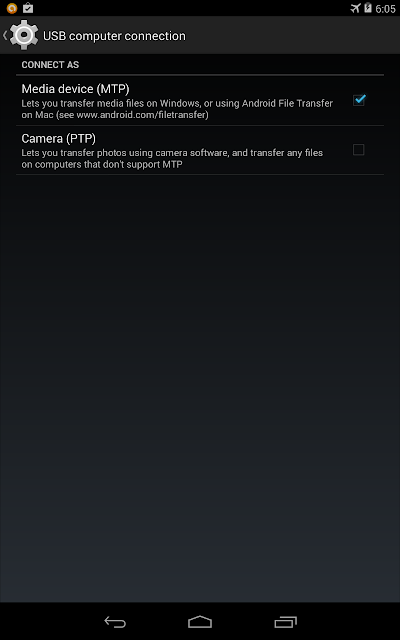
How To Solve Nexus 7 Not Detected As MTP in Windows 64bit


I just had my Nexus 7 2012 for quite some time. Last day I tried to record my screen using adb shell in Kit Kat and installed adb drivers. After installing the drivers for adb i tried connecting my nexus 7 to PC and boom! The USB connections gone berserk. It gets connected and disconnected always.  I Didnt have any idea why it was acting like that. For some time Nexus 7 wasnt even detected in my Device manager. That was shocking, as i suspected something wrong with my Nexus. After plugging to again , but using PTP option now, worked, but can only views picture folders.

Anyway i narrowed my suspicions to the following

  •  I have enabled USB debbugging options from Developer Options. It might cause such an issue
  •  The USB cable from ASUS went died.
  • ADB drivers screwed up
Well after a quick thought I focused my thought on ADB drivers. So I went to Device manager while connecting Nexus 7 in PTP mode. 

Here are the steps i did to fix this issue
  • Disable USB Debugging . Connect your Device in PTP mode.
  • Go to device manager : Right click on My computer->Manage->select Device Manager
  • At the top it will list Android device->Nexus 7 . Right click on it and select Uninstall and,
  • Make sure you tick-"Delete Software " option. Press OK
  • Now remove cable from system. and reconnect it.
  • It will recognize your nexus 7 now.

Hope this was helpful for all those who faced similar issues.
 
Read more »

Tuesday, May 6, 2014

Nokia Lumia Successfully Sell 7 4 Million Units in Second Quarter 2013


Nokia has just announced their financial statements in the period in the second quarter of the year 2013 (April - June). How is the performance brand of cell phone that is now synonymous with the Windows Phone and the Lumia?

Quite interesting, there were 7.4 million units of Lumia phones have been sold in the second quarter of 2013. This figure is the highest ever achieved by Nokia since Nokia adopting the Windows Phone operating system as the main operating system on the phone series.

In the first quarter yesterday, Nokia itself has sold approximately 5.6 million units of Lumia. This means that Nokia managed to record excellent growth with a rate of 32%. In addition, Nokia will be relisted predicted good growth in the third quarter of 2013. It is no other than due to the presence of the Nokia 1020 with a 41 megapixel camera.
Read more »

Saturday, May 3, 2014

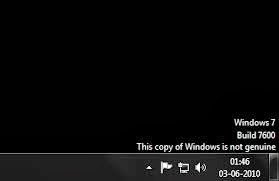
How to Eliminate Windows 7 Build 7600 This copy of Windows is not genuine

Users of Microsoft Windows 7 must have been familiar with the Windows Genuine Advantage ( WGA ) is automatically downloaded if you turn on Windows Update. To get rid of WGA relatively easy because if you re looking for through search sites like Google then it will be quite a lot of websites that provide instructions to remove the WGA. But for your first time using Windows 7 may be quite surprised because it looks different from the WGA and certainly already installed on your computer.

Micosoft is no longer using the WGA in Windows 7 but replace it with the Windows Activation Technologies ( WAT ). WAT including updates type "Important " so if you set Windows Update to be " Install updates automatically it will be automatically installed on your computer. Moreover, the name of this update does not contain the " Windows Genuine Advantage " and " Windows Activation Technologies " but rather " Update for Windows 7 for x86 - based Systems ( KB971033 ) " so for those of you who do not carefully read the detailed description of this update can be skipped checkboxnya fixed checked. If WAT is already installed, an alert box will appear on your computer titled "This copy of Windows is not genuine ". Your desktop wallpaper will disappear replaced with a black screen in the bottom right corner reads : copy of windows is not genuine build 7600.


To remove it you have to do is :
  • Open the Control Panel and select Windows Update.
  •  Select the "Installed Updates " which is in the lower left corner.
  • Look for the " Update for Windows 7 for x86 - based Systems ( KB971033 ) " . Right click and select Uninstall.
  • Once the uninstall is complete please restart your computer.
Once you are logged in the desktop still displays a black screen and it says " This copy of Windows is not genuine " is still there in the lower right corner. To remove it you have to do is :
  • Click on " start " then "all programs " find and click "Accessories " then click " Command Prompt ".
  • In the cmd window that has been opened typing slmgr.vbs - rearm and enter.
  • Please restart your computer .
Once you are logged in should the words " This copy of Windows is not genuine " has disappeared from your desktop. However, because you have to uninstall " Update for Windows 7 for x86 - based Systems ( KB971033 ) " then Windows Update will automatically download these updates back to your computer. We recommend that you change the Windows Update settings into " Check for updates but let me choose to download and install Whether Them ". And if Windows Update displays " Update for Windows 7 for x86 - based Systems ( KB971033 ) " that you have to do is RIGHT click and select "Hide update " to make sure this never WAT update installed again. Similarly, to remove Windows 7 Build 7600 This copy of Windows is not genuine May be useful for you.
Read more »