Showing posts with label build. Show all posts
Showing posts with label build. Show all posts
Saturday, May 3, 2014
How to Eliminate Windows 7 Build 7600 This copy of Windows is not genuine
Users of Microsoft Windows 7 must have been familiar with the Windows Genuine Advantage ( WGA ) is automatically downloaded if you turn on Windows Update. To get rid of WGA relatively easy because if you re looking for through search sites like Google then it will be quite a lot of websites that provide instructions to remove the WGA. But for your first time using Windows 7 may be quite surprised because it looks different from the WGA and certainly already installed on your computer.
Micosoft is no longer using the WGA in Windows 7 but replace it with the Windows Activation Technologies ( WAT ). WAT including updates type "Important " so if you set Windows Update to be " Install updates automatically it will be automatically installed on your computer. Moreover, the name of this update does not contain the " Windows Genuine Advantage " and " Windows Activation Technologies " but rather " Update for Windows 7 for x86 - based Systems ( KB971033 ) " so for those of you who do not carefully read the detailed description of this update can be skipped checkboxnya fixed checked. If WAT is already installed, an alert box will appear on your computer titled "This copy of Windows is not genuine ". Your desktop wallpaper will disappear replaced with a black screen in the bottom right corner reads : copy of windows is not genuine build 7600.
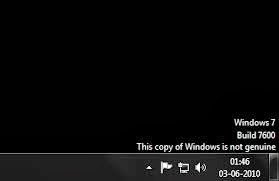
To remove it you have to do is :
- Open the Control Panel and select Windows Update.
- Select the "Installed Updates " which is in the lower left corner.
- Look for the " Update for Windows 7 for x86 - based Systems ( KB971033 ) " . Right click and select Uninstall.
- Once the uninstall is complete please restart your computer.
- Click on " start " then "all programs " find and click "Accessories " then click " Command Prompt ".
- In the cmd window that has been opened typing slmgr.vbs - rearm and enter.
- Please restart your computer .

Samsung Galaxy S2 Ice Cream Sandwich Build with TouchWiz Leaked
 We have already seen a ported version of Android 4.0 Ice Cream Sandwich running on the Samsung Galaxy S II, and now it would appear that an early build of Ice Cream Sandwich along with Samsung’s TouchWiz UI has been leaked.
Well according to a post on SamMobile, we might just have ourselves the first indication of how things on the latter might shape up.

A four minute video shows off a very early build of Ice Cream Sandwich for the Galaxy S2 and so far we’re not seeing any huge differences in the UI to how things are on the Gingerbread-running Galaxy S2.
Features like FaceUnlock are there as it the ability to call up a list of recent tasks. But the custom UI is more or less the same.
Again, this is an early version of a custom Samsung build that SamMobile has obtained. So along with ironing out a few problems with apps force closing, the final version might have a radically redrawn UI, something more along the lines of how TouchWiz looks on the Galaxy Tab 10.1 perhaps?
Again, this is an early version of a custom Samsung build that SamMobile has obtained. So along with ironing out a few problems with apps force closing, the final version might have a radically redrawn UI, something more along the lines of how TouchWiz looks on the Galaxy Tab 10.1 perhaps?
Subscribe to:
Posts (Atom)