Showing posts with label windows. Show all posts
Showing posts with label windows. Show all posts
Saturday, August 9, 2014
Hide ur drives Lock ur drives in Windows
Open Registry (go to run command, type “regedit” and press enter)
then go to this key
HKEY_CURRENT_USERSoftwareMicrosoftWindows Curre ntVersionPoliciesExplorer
now right click in right side pane and create DWORD Value (blue color)
Rename it as “NoViewOnDrive” (for locking drive)
or
Rename it as “NoDrives” (for Hiding drive)
or
Rename it as “NoDrives” (for Hiding drive)
double click on it and put some numbers to lock ur desired Drive and click ok.
DRIVE NOS.
FOR A : 1
FOR C : 4
FOR D : 8
FOR E : 16
FOR F : 32
FOR G : 64
FOR H : 128
FOR A : 1
FOR C : 4
FOR D : 8
FOR E : 16
FOR F : 32
FOR G : 64
FOR H : 128
finally restart or log-off the computer to take effect.
Keep in mind that “0″ is Default Value to Disable or remove this setting..
After locking the drive when u try to open it, u will see a msgbox like this
“This operation has been cancelled due to restrictions in effect on this computer. Please contact your system administrator”
“This operation has been cancelled due to restrictions in effect on this computer. Please contact your system administrator”

Wednesday, June 25, 2014
Nokia Lumia 720 Mobile Windows Phone 8 6 7 Camera Price and Specifications
Nokia Lumia 720 Mobile WindowsPhone8 6.7 Camera Price and Specifications | Mobile Nokia Lumia 720 comes with a stylish design, plus innovative features such as Enhanced Sunlight Readability and Super Sensitive Touch seems that existed at the previous Lumia 920. Nokia Lumia 720 is powered by a dual core 1GHz processor and 512MB of RAM. Nokia Lumia 720 is also equipped with 8GB of internal memory plus a microSD slot, NFC, WiFi, 3G HSPA +, Bluetooth, 2000mAh battery capacity, and support wireless charging.
Nokia Lumia 720 comes with a 4.3-inch touch screen with ClearBlack technology support and Gorilla Glass 2. Fingerprints are not an issue anymore because with this technology the screen is easy to clean, and also increased the visibility of a different perspective and broader. Nokia Lumia 720 using a 6.7 megapixel main camera with f/1.9 aperture and Carl Zeiss optics. Larger aperture, it means more incoming light, and with the combination of Carl Zeiss optics will produce quality pictures are more clear and bright when shooting under low light conditions. Nokia Lumia 720 is also equipped with a front camera Skype HD wide angle 1.3 megapixel.

Specifications Nokia Lumia 720:
- Networks: GSM / EDGE: 850 (5) / 900 (8) / 1800 (3) / 1900 (2) MHz WCDMA: 850 (5) / 900 (8) / 1900 (2) / 2100 (1) MHz HSPA +: 21 Mbps (Cat 14)
- OS: Windows Phone 8, GDR1
- CPU: MSM8227, 1.0 GHz
- RAM: 512 MB
- Storage: 8 GB + microSD Card Slot
- Display: 4.3 "WVGA ClearBlack LCD, 2.25 D Glass, Super Sensitive Touch
- Camera: Back: 6.7 MPIX, BSI, Auto-Focus, Carl Zeiss optics, LED flash, HD 720p @ 30 fps at Front: Skype HD wide angle (1.3Mpix)
- Connectivity: NFC, A-GPS + GLONASS, WLAN (2.4/5Ghz) a / b / g / n, μUSB, BT 3.0, 3D Accelerometer, Proximity, Magnetometer, Automatic Light Sensor. (No Gyroscope).
- Battery: 2000 mAh battery + Wireless Charging Cover Accessory; 520hrs standby, talk time 13.5hrs
- Audio: 2 HAAC (high-amplitude audio capture) mics, HD Voice (wideband audio, noise cancellation)
- Size: 127.9 x 67.5 x 9mm
- Weight: 128g
- Colours: Gloss: White
- Matte: Red, Yellow, Cyan & Black
- Priced Around U.S. $330.
Friday, May 9, 2014
Solve MTP Issue On Nexus 7 Device Not Detected x64 Windows
How To Solve Nexus 7 Not Detected As MTP in Windows 64bit
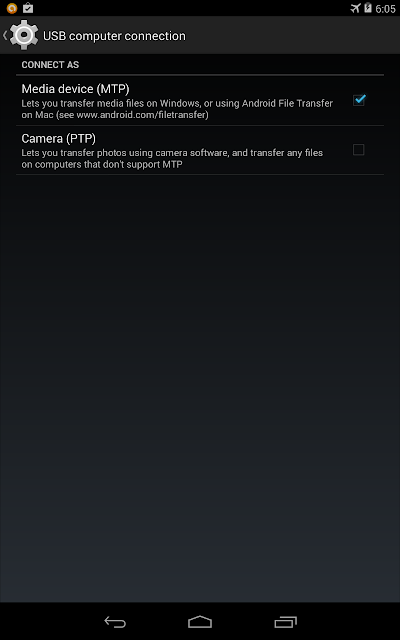
I just had my Nexus 7 2012 for quite some time. Last day I tried to record my screen using adb shell in Kit Kat and installed adb drivers. After installing the drivers for adb i tried connecting my nexus 7 to PC and boom! The USB connections gone berserk. It gets connected and disconnected always. I Didnt have any idea why it was acting like that. For some time Nexus 7 wasnt even detected in my Device manager. That was shocking, as i suspected something wrong with my Nexus. After plugging to again , but using PTP option now, worked, but can only views picture folders.
Anyway i narrowed my suspicions to the following
- I have enabled USB debbugging options from Developer Options. It might cause such an issue
- The USB cable from ASUS went died.
- ADB drivers screwed up
Here are the steps i did to fix this issue
- Disable USB Debugging . Connect your Device in PTP mode.
- Go to device manager : Right click on My computer->Manage->select Device Manager
- At the top it will list Android device->Nexus 7 . Right click on it and select Uninstall and,
- Make sure you tick-"Delete Software " option. Press OK
- Now remove cable from system. and reconnect it.
- It will recognize your nexus 7 now.
Hope this was helpful for all those who faced similar issues.
Thursday, May 8, 2014
Microsoft will provide free Windows for Mobile Phones and Tablets
Microsoft will provide free Windows operating system for smartphones and tablet makers in an effort to improve competitiveness against the success of Googles free Android platform Inc. The move was announced at Microsofts annual developer conference in San Francisco, with the hope that more customers are using Microsofts hook and eventually will make money, also using cloud-based services such as Skype and Office.
Until now Microsoft charge to manufacturers of mobile phones and tablets between 5 dollars and 15 U.S. dollars for device to use its Windows system, as it has done in Windows for years.
Until now Microsoft charge to manufacturers of mobile phones and tablets between 5 dollars and 15 U.S. dollars for device to use its Windows system, as it has done in Windows for years.

Tuesday, May 6, 2014
Acer Aspire P3 Combined Tablet and Ultrabook with Windows 8

Acer launched the Acer Aspire Ultrabook P3 Hybrid, a hybrid tablet and ultrabook with a design that is easy to be transformed from notebook mode to tablet mode.
We understand that moving consumer trends in the use of the touch screen for computing in performing daily activities, "said Jason Lim, President Director, Acer Indonesia.
Acer Aspire Ultrabook P3 improve touch computing experience by providing responsive performance, fast boot times, and long battery life as what we want from a mobile PC. Acer Aspire Ultrabook P3 deliver real capabilities, so that users can perform day-to-day computing activities. Processor Intel Core i3 and Intel Core i5 provides a responsive performance needed to do these things, and make more efficient battery consumption. Aspire P3 uses Windows 8, so that the device can run Office programs as well as other Windows programs that are essential to productivity.
For P3 Aspire operating system using Windows 8, so that the device can run Office programs as well as other Windows programs are important for various business purposes. Chiclet keyboard on the Aspire P3 is made with a full size. The data storage medium in the form of solid state drive (SSD) 60GB or 120GB, is also accompanied by a full sized USB 3.0 ports so that users can easily connect to an external device Aspire P3.
Screen measuring 11.6-inch and IPS technology with 170-degree viewing angle capability, the Aspire P3 screen can display images properly from all sides. Feature Dolby Home Theater for headphones and built-in speakers in it gives the best sound quality. Audio and video on the Aspire P3 can be displayed on an additional display through the HDMI port. Acer Crystal Eye HD webcam can record up to 720p HD video, while the 5MP rear camera can shoot.
Saturday, May 3, 2014
How to Eliminate Windows 7 Build 7600 This copy of Windows is not genuine
Users of Microsoft Windows 7 must have been familiar with the Windows Genuine Advantage ( WGA ) is automatically downloaded if you turn on Windows Update. To get rid of WGA relatively easy because if you re looking for through search sites like Google then it will be quite a lot of websites that provide instructions to remove the WGA. But for your first time using Windows 7 may be quite surprised because it looks different from the WGA and certainly already installed on your computer.
Micosoft is no longer using the WGA in Windows 7 but replace it with the Windows Activation Technologies ( WAT ). WAT including updates type "Important " so if you set Windows Update to be " Install updates automatically it will be automatically installed on your computer. Moreover, the name of this update does not contain the " Windows Genuine Advantage " and " Windows Activation Technologies " but rather " Update for Windows 7 for x86 - based Systems ( KB971033 ) " so for those of you who do not carefully read the detailed description of this update can be skipped checkboxnya fixed checked. If WAT is already installed, an alert box will appear on your computer titled "This copy of Windows is not genuine ". Your desktop wallpaper will disappear replaced with a black screen in the bottom right corner reads : copy of windows is not genuine build 7600.
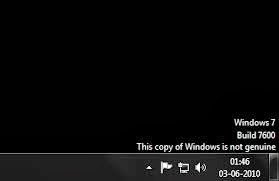
To remove it you have to do is :
- Open the Control Panel and select Windows Update.
- Select the "Installed Updates " which is in the lower left corner.
- Look for the " Update for Windows 7 for x86 - based Systems ( KB971033 ) " . Right click and select Uninstall.
- Once the uninstall is complete please restart your computer.
- Click on " start " then "all programs " find and click "Accessories " then click " Command Prompt ".
- In the cmd window that has been opened typing slmgr.vbs - rearm and enter.
- Please restart your computer .
Wednesday, April 30, 2014
WLCGram Instagram Client Application for Windows Phone
.jpg)
Photo sharing application Instagram has been very popular among users of Android and iOS smart phones. But unfortunately Windows Phone smart phone users still have to wait to be able to use this application, because until recently the Instagram still silent about their plans for this one platform. Nokia itself as the largest WP vendors have expressed their support in order to Instagram coming soon to mobile-phone operating system Windows Phone.
While waiting for the official Instagram app is present, there is no harm we peek one of Instagram client application on Windows Phone, which WLCGram. WLCGram is one of Instagram client on Windows Phone that has capabilities similar to the original Instagram application. Some of the features include are:
- filter image
- could register
- Can view photos on Instagram
- Can menshare photos to Instagram
- Can search by username or hashtag.
.
Unfortunately, the users of this application have not been able to:
- Did comment and like
- see video
- Menshare to Facebook and Twitter.
- and some other weaknesses.
With all its limitations and its advantages, the application is priced at $ 0.99 with a free trial option for 9 hours in advance. Interested?
Subscribe to:
Posts (Atom)