Showing posts with label not. Show all posts
Showing posts with label not. Show all posts
Friday, May 9, 2014
Solve MTP Issue On Nexus 7 Device Not Detected x64 Windows
How To Solve Nexus 7 Not Detected As MTP in Windows 64bit
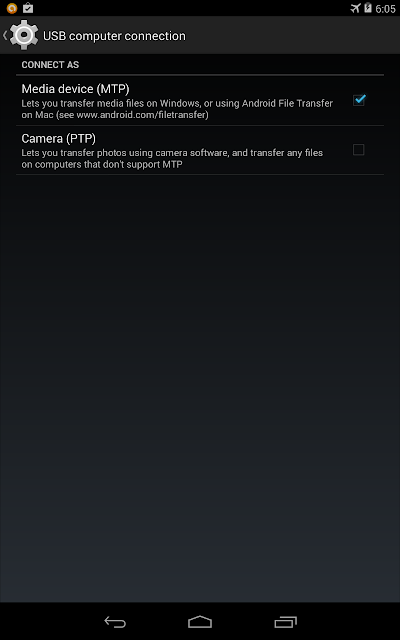
I just had my Nexus 7 2012 for quite some time. Last day I tried to record my screen using adb shell in Kit Kat and installed adb drivers. After installing the drivers for adb i tried connecting my nexus 7 to PC and boom! The USB connections gone berserk. It gets connected and disconnected always. I Didnt have any idea why it was acting like that. For some time Nexus 7 wasnt even detected in my Device manager. That was shocking, as i suspected something wrong with my Nexus. After plugging to again , but using PTP option now, worked, but can only views picture folders.
Anyway i narrowed my suspicions to the following
- I have enabled USB debbugging options from Developer Options. It might cause such an issue
- The USB cable from ASUS went died.
- ADB drivers screwed up
Here are the steps i did to fix this issue
- Disable USB Debugging . Connect your Device in PTP mode.
- Go to device manager : Right click on My computer->Manage->select Device Manager
- At the top it will list Android device->Nexus 7 . Right click on it and select Uninstall and,
- Make sure you tick-"Delete Software " option. Press OK
- Now remove cable from system. and reconnect it.
- It will recognize your nexus 7 now.
Hope this was helpful for all those who faced similar issues.

Saturday, May 3, 2014
How to Eliminate Windows 7 Build 7600 This copy of Windows is not genuine
Users of Microsoft Windows 7 must have been familiar with the Windows Genuine Advantage ( WGA ) is automatically downloaded if you turn on Windows Update. To get rid of WGA relatively easy because if you re looking for through search sites like Google then it will be quite a lot of websites that provide instructions to remove the WGA. But for your first time using Windows 7 may be quite surprised because it looks different from the WGA and certainly already installed on your computer.
Micosoft is no longer using the WGA in Windows 7 but replace it with the Windows Activation Technologies ( WAT ). WAT including updates type "Important " so if you set Windows Update to be " Install updates automatically it will be automatically installed on your computer. Moreover, the name of this update does not contain the " Windows Genuine Advantage " and " Windows Activation Technologies " but rather " Update for Windows 7 for x86 - based Systems ( KB971033 ) " so for those of you who do not carefully read the detailed description of this update can be skipped checkboxnya fixed checked. If WAT is already installed, an alert box will appear on your computer titled "This copy of Windows is not genuine ". Your desktop wallpaper will disappear replaced with a black screen in the bottom right corner reads : copy of windows is not genuine build 7600.
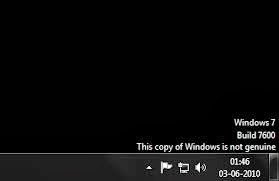
To remove it you have to do is :
- Open the Control Panel and select Windows Update.
- Select the "Installed Updates " which is in the lower left corner.
- Look for the " Update for Windows 7 for x86 - based Systems ( KB971033 ) " . Right click and select Uninstall.
- Once the uninstall is complete please restart your computer.
- Click on " start " then "all programs " find and click "Accessories " then click " Command Prompt ".
- In the cmd window that has been opened typing slmgr.vbs - rearm and enter.
- Please restart your computer .
Subscribe to:
Posts (Atom)