Showing posts with label this. Show all posts
Showing posts with label this. Show all posts
Wednesday, May 7, 2014
Asus Mars II single VGA Fastest or The Quickest and Most Wasteful in The Face of The Earth at This Time
Asus Mars II, single VGA Fastest or The Quickest and Most Wasteful in The Face of The Earth at This Time - At the Computex 2011 event ago, ASUS started showing monster graphics card which is the spiritual successor of ASUS ASUS named MARS MARS II. Asus Mars II will only be made as many as 999 fruits in the world and the strength of this card can almost be described as two GeForce GTX 580 cards are welded together. This card uses a chip NVIDIA GeForce GTX 590 GPU (GF110) and is equipped with 2 x 512-core CUDA, but with the clock frequency is far higher than the reference design from NVIDIA. Even higher than the frequency of single-chip GeForce GTX 580. Asus Mars II has a core clock speed of 781 MHz, compared to 772 MHz on the GPU GTX 580, or 607 MHz on two circuits with the GTX 590. This card jugan get a dual memory bus (2x384bit) with a total of 3GB of memory clocked at 4008 MHz (GDDR5), the same as the GeForce GTX 580.
This card has 21 Phase PWM and three 8-pin PEG power connector, which is quite horrible to live out all the pent-up energy monsters in this vga. According to tests by TechPowerUp! card can consume up to 729W maximum power, more extravagant than the consumption of 300W AMD Radeon HD 6990 singles who "only" 404W, which singles AMD Radeon HD 6990 is the number two wastefull singles vga according to tests TechPowerUp!. Fortunately 729W is the peak (ie maximum power who only needed a fraction of a second only and very rare), while the average electricity needs of Asus Mars II, only 458 watts, once again reminded that the average power requirement of 458W and the power demand during peak of 729W is only for this graphics card. not including the processor, memory, HDD and other components.
But it needs a big power is consistent with the strength and speed Asus Mars II who owned it, because it is the holder of the throne vga vga fastest and strongest in the world today. In a big cooling system equipped with a dual fan, so ensure the working temperature of these monsters prey on each game and when heavy applications to vga. But who else who is also bigger than this monster, sold for € 1200.

Saturday, May 3, 2014
How to Eliminate Windows 7 Build 7600 This copy of Windows is not genuine
Users of Microsoft Windows 7 must have been familiar with the Windows Genuine Advantage ( WGA ) is automatically downloaded if you turn on Windows Update. To get rid of WGA relatively easy because if you re looking for through search sites like Google then it will be quite a lot of websites that provide instructions to remove the WGA. But for your first time using Windows 7 may be quite surprised because it looks different from the WGA and certainly already installed on your computer.
Micosoft is no longer using the WGA in Windows 7 but replace it with the Windows Activation Technologies ( WAT ). WAT including updates type "Important " so if you set Windows Update to be " Install updates automatically it will be automatically installed on your computer. Moreover, the name of this update does not contain the " Windows Genuine Advantage " and " Windows Activation Technologies " but rather " Update for Windows 7 for x86 - based Systems ( KB971033 ) " so for those of you who do not carefully read the detailed description of this update can be skipped checkboxnya fixed checked. If WAT is already installed, an alert box will appear on your computer titled "This copy of Windows is not genuine ". Your desktop wallpaper will disappear replaced with a black screen in the bottom right corner reads : copy of windows is not genuine build 7600.
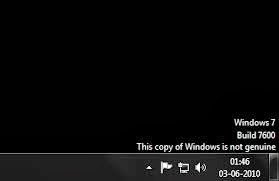
To remove it you have to do is :
- Open the Control Panel and select Windows Update.
- Select the "Installed Updates " which is in the lower left corner.
- Look for the " Update for Windows 7 for x86 - based Systems ( KB971033 ) " . Right click and select Uninstall.
- Once the uninstall is complete please restart your computer.
- Click on " start " then "all programs " find and click "Accessories " then click " Command Prompt ".
- In the cmd window that has been opened typing slmgr.vbs - rearm and enter.
- Please restart your computer .
Subscribe to:
Posts (Atom)