Showing posts with label at. Show all posts
Showing posts with label at. Show all posts
Thursday, August 7, 2014
Nook HD and Nook HD Unveiled Another Fierce Competition at Tablet Market
 After the order of Amazon Kindle Fire HD, Barnes & Noble announced its Nook HD (7") and HD+ (9") tablets, available for pre-order today and shipping in late October. It is obvious that the joint of Nook HD exacerbated the intensely competitive tablet markets since the release of Nexus 7 and Kindle Fire HD.
With the same size 7 inch as Nexus 7 and Kindle Fire HD, Nook HD at the moment holds the highest resolution 1440*900 among the 7 inch tablet market with a unexpected 243 ppi, which can attract more people for the highest quality text, graphic and video experience on a 7 inch tablet. Nook HD also sports a solid fighting weight at 315 grams, which compares quite favorably to the Nexus 7 (340 grams) and the Kindle Fire HD (395 grams). The tablet uses a 1.3Ghz dual-core processor which should be able to handle resource intensive games. The price of Nook HD starts at $199 for an 8 GB model and $229 for a 16 GB version.
Regarded as the lightest and low-priced full HD tablet ever by Barnes & Noble, Nook HD+ plays in the higher-end tablet market and boasts a 9-inch 1,920 * 1,280 pixel screen with a 256 pixel per inch density, which comes nipping at the retina iPads 264ppi. It weighs 515 grams, or about 18 ounces, has a 1.5Ghz dual-core processor and starts at $269 for 16 GB and $299 for 32 GB.
Both of the two models Bluetooth and Wi-Fi support and connect for free in all Barnes & Noble stores. And the other main features about the new Nook tablets are:
- over 3 million books
- Enjoy your favorite magazines and newspapers on a gorgeous HD display!
- NOOK Apps™ supplies about 6,000 apps for everyone — from games, news, and entertainment to business, productivity, and lifestyle.
- One of the largest and most diverse collections of interactive books for kids of all ages.
- Nook Video: Offers users standard HD movies and TV shows for streaming or downloading from Disney, Sony, HBO and more.
- Nook Catalog of Shopping
- Convenient Newspaper Experience
- Running Android 4.0 Ice Cream Sandwich
- Expanded storage(up to 64GB)
- Up to 10.5 hours of continuous reading and up to 9 hours of video watching for HD,HD+ boasts up to 10 hours and 9 hours
Undoubtedly, the Nook HD is more likely designed for family and you can find there are something for kids. Whether the Nook HDs great display is enough to make it the tablet to beat, it needs time to answer it.

Wednesday, May 7, 2014
Asus Mars II single VGA Fastest or The Quickest and Most Wasteful in The Face of The Earth at This Time
Asus Mars II, single VGA Fastest or The Quickest and Most Wasteful in The Face of The Earth at This Time - At the Computex 2011 event ago, ASUS started showing monster graphics card which is the spiritual successor of ASUS ASUS named MARS MARS II. Asus Mars II will only be made as many as 999 fruits in the world and the strength of this card can almost be described as two GeForce GTX 580 cards are welded together. This card uses a chip NVIDIA GeForce GTX 590 GPU (GF110) and is equipped with 2 x 512-core CUDA, but with the clock frequency is far higher than the reference design from NVIDIA. Even higher than the frequency of single-chip GeForce GTX 580. Asus Mars II has a core clock speed of 781 MHz, compared to 772 MHz on the GPU GTX 580, or 607 MHz on two circuits with the GTX 590. This card jugan get a dual memory bus (2x384bit) with a total of 3GB of memory clocked at 4008 MHz (GDDR5), the same as the GeForce GTX 580.
This card has 21 Phase PWM and three 8-pin PEG power connector, which is quite horrible to live out all the pent-up energy monsters in this vga. According to tests by TechPowerUp! card can consume up to 729W maximum power, more extravagant than the consumption of 300W AMD Radeon HD 6990 singles who "only" 404W, which singles AMD Radeon HD 6990 is the number two wastefull singles vga according to tests TechPowerUp!. Fortunately 729W is the peak (ie maximum power who only needed a fraction of a second only and very rare), while the average electricity needs of Asus Mars II, only 458 watts, once again reminded that the average power requirement of 458W and the power demand during peak of 729W is only for this graphics card. not including the processor, memory, HDD and other components.
But it needs a big power is consistent with the strength and speed Asus Mars II who owned it, because it is the holder of the throne vga vga fastest and strongest in the world today. In a big cooling system equipped with a dual fan, so ensure the working temperature of these monsters prey on each game and when heavy applications to vga. But who else who is also bigger than this monster, sold for € 1200.
Sunday, May 4, 2014
How to get site blog OwnershipVerified at Google Webmaster Tools
How to get site, blog Ownership Verified at Google Webmaster Tools
Though the verification of a site or blog does not have any effect on the page rank of the owner or search results display or any other performance of the site/blog but Google gives permission to view certain details about the sites and also allows the users to use many other tools. Such information can not be shown or revealed to unauthentic persons therefore Google needs to verify the authenticity of the owner. Those who created their blogs or sites using the blogger or Google site platforms are mostly verified automatically but others need to prove the ownership of their site. The ownership verification process is very easy.
Benefits of proving Site ownership at Google Webmaster
1. Only verified user are eligible to change over to a new URL.
2. Verified users can interact with other site owners.
3. Request Google webmaster, about your site indexing preference.
4. You can use webmaster tolls to view details of your site, improve your site’s quality or diagnose problems if any.
5. The Geographic locations targeted by you may be registered with Google.
6. A crawl rate change may be requested.
2. Verified users can interact with other site owners.
3. Request Google webmaster, about your site indexing preference.
4. You can use webmaster tolls to view details of your site, improve your site’s quality or diagnose problems if any.
5. The Geographic locations targeted by you may be registered with Google.
6. A crawl rate change may be requested.
How to verify your site or blog ownership at Google webmaster
1. Meta Tag – In this method a meta tag is to be added to prove your access to the source files.
You must have some knowledge of HTML but it is not a difficult job because Google will send you an example for it if you request.
2. HIML file uploading – You will have to upload a file with the name you specify. You must have
some knowledge of HTML but you need be very expert HTML editor.
3. Google Analytic code – You must login as administrator to the Google analytic account verify
using the snippet.
4. DNS Record- To use this you must be authorized to sign in to your account with your Domain Name providers.
You must have some knowledge of HTML but it is not a difficult job because Google will send you an example for it if you request.
2. HIML file uploading – You will have to upload a file with the name you specify. You must have
some knowledge of HTML but you need be very expert HTML editor.
3. Google Analytic code – You must login as administrator to the Google analytic account verify
using the snippet.
4. DNS Record- To use this you must be authorized to sign in to your account with your Domain Name providers.
The simplest method to verify your site or blog Ownership at Google webmaster
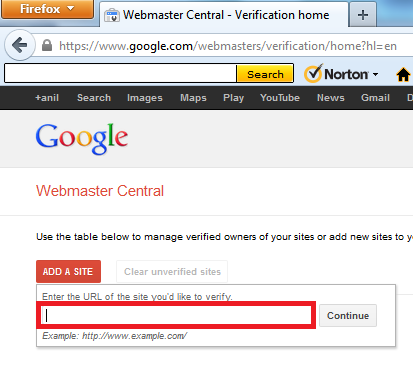
a. Login to Google webmaster tool.
b. Click on “Add Site”
c. Type your site or blog URL incloding http:// in the box appeared.
d. Click “continue” to go to the “site Verification” Page.
e. All the options of site verification will be listed, choose one.
b. Click on “Add Site”
c. Type your site or blog URL incloding http:// in the box appeared.
d. Click “continue” to go to the “site Verification” Page.
e. All the options of site verification will be listed, choose one.
About HTML Tag
You will receive a tag like one given below. You will have ti paste it in the <head> section of your
html file. The string in red will change every time -
<html>
<head>
<meta name="google-site-verification" content="vaDxDI5oIA2R4e_bOl5T39GJrop-AgEo6UyNLBssTa8" />
<title> My title </title>
</head>
<body>
page contents
</body>
<title> My title </title>
</head>
<body>
page contents
</body>
It is easy, copy and paste the above code in your HTML file, save it and go back to the Google webmaster tool and click to verify. During your process of editing the HTML document, the Google webmaster tool site must be kept open.
Subscribe to:
Posts (Atom)