Showing posts with label custom. Show all posts
Showing posts with label custom. Show all posts
Tuesday, October 14, 2014
Samsung Galaxy S I9000 Froyo and Gingerbread Custom ROM List May 2011
Heres the List of Samsung Galaxy S I9000 Custom ROM Froyo and Gingerbread as May 2011 update.

"I will try to update more Custom List from time to time but its quite impossible: so just forgive me if I missing something" The files are not in particular order, so just see the date it was originally created. It includes Custom ROMs from past few months.
Installation of this ROMs are also prepared by the developers, you may also ask and get infos for some bugs or any other related issues to a particular ROMs.
*Note: ROM name
Build Date
ROM version
You may know the creator to follow the links
and if you feel by donating them for their great works
MIUI 2.3.3 (1.4.29 RC7c)
05.05.2011
Custom CyanogenMod Build
ROM Kitchen
(03/05/2011)
Various Firmwares available
Ultimate(8.2)
(25/03/2011)
XWJS8
GingerCriskelo (v46)
(05/05/2011)
XXJVK
Darkys Extreme Edition (v9.5/10 RC6)
(04/05/2011)
Juwes Smart Edition (v4.2)
(30/04/2011)
Various Firmwares available
(30/04/2011)
Various Firmwares available
Deodexed Stock Firmware Collection
(28/04/2011)
Various Firmwares available
(28/04/2011)
Various Firmwares available
Turbo Ginger (v2.0.0)
(16/04/2011)
XXJVK
(16/04/2011)
XXJVK
Simple Honey (v3.2 Final)
(02/05/2011)
XXJVK
(02/05/2011)
XXJVK
c0llal0-rel0ad3d-3.2
(30/04/2011)
XWJVB
(30/04/2011)
XWJVB
HaWkiSH 2 ROM
02.05.2011
XWJS7
02.05.2011
XWJS7
CyanogenMod 7
Regularly updated (Nightly Builds)
Custom CyanogenMod Build
Regularly updated (Nightly Builds)
Custom CyanogenMod Build
Serendipity (v6.3)
27.03.2011
XWJVB
27.03.2011
XWJVB
insanity (v8.1)
24.04.2011
XWJS8
24.04.2011
XWJS8
GingerReal (v3.1)
26.04.2011
XXJVK
26.04.2011
XXJVK
Tiramisu (v3.20)
09.04.2011
XXJVK
09.04.2011
XXJVK
Orion ROM
11.04.2011
XWJS8
11.04.2011
XWJS8
Thunder (v1.0)
02.05.2011
XXJVK
02.05.2011
XXJVK
DebusROM (vG1)
23.04.2011
XWJVB
23.04.2011
XWJVB
Lailas ROM
10.04.2011
Various Firmwares available
10.04.2011
Various Firmwares available
Tweaky ROM
(05/17/2010)v4.1 (JVH)
Insanity
(05/17/2011) v8.4 (JVH)
GingerCriskelo
(05/16/2011)V56 (JVH)
CyanogenMod
(05/16/2010) V7 Nightlies (2.3.4)
GingerReal
(05/15/2010) v3.5 (JVH)
Hamsterbread
(05/15/2011)2.0 (JVH)
PinPongs-Rom
(05/15/2010)2.0 (JVH)
7Linux ROM
(05/14/2010) v2.6 (JVH)
Juwes
Smart Edition
(05/13/2011)Smart Edition
v4.3.1 (JVH)
MIUI SGS
(05/13/2011)1.5.13 v1 (2.3.4)
Baldoz ROM
(05/11/2010) 5.1 (JVB)
The Magical ROM Kitchen
(05/10/2011)V2 (JVH)
Goatrip
(05/09/2010)1.9.1
Simply Honey
(05/08/2011)3.3 (JVB)
EZbase
(04/25/2011) v3.0
DebusROM
(04/23/2011) G1
Darkys
Extreme Edition
(04/15/2011)v10.0 RC6 (JVK)
Tricky103’s
Lucid Lailas Rom
(04/10/2011)v1.7
Serendipity
(03/27/2010)6.3
Criskelo ROM
(03/26/2010)V75
Simply Galaxy ROM
(03/26/2010)
V2.7 (JPJ)
Ultimate
(03/25/2011) v8.2 (JS8)
Ultibread!
(04/03/2010)V1.4 UPDATE2
ZeroGingerbread
(03/04/2011)
BETA2 (JV1)
Sconcau_eXtreme
(02/27/2011)2.0 (JS5)
MIUI-4-I9000
(02/14/2011)
seeARMS
Customizable UGJL2
(02/13/2011) v0.4 (JL2)
DamianGTO
Steam Rom
(02/11/2010)*Link sources from xda-developer

Wednesday, September 17, 2014
How To Change Blogger Post URL and Custom Permalink URL
Whenever we publish a new post, Blogger automatically generates the post URL according to the title of the blog post. For example, if the post title is How to Create Custom Post URL in Blogger? then Blogger will generate http://www..com/2013/07/how-to-create-custom-post-url-in-blogger.html as the post URL. If you want to change this URL to a small SEO friendly one here comes the solution.
Recently Blogger introduced an option named Permalink in Post settings to edit the post URL to your desired one. In this post I included the simple steps to use custom permalink in Blogger blog. Here are the steps.
Steps:
Note : If you have Permalink Option in your Blogger Post Settings Start fromStep 2.
1. Open a post you wish to edit the URL or Create a New Post.
(If you are editing a published post, then click on Revert to draft button to enable Permalink editing.)

2. Then click Permalink in Post Settings.
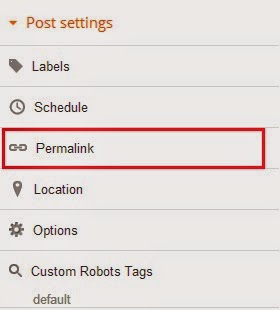
3. Now check the Custom URL radio button and type the new post URL in Custom URL text field. After changing the URL dont forget to click Done!
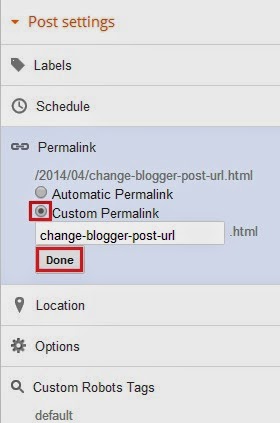
4.Finally, Click Publish .
Thats it...Now check the post URL it will be changed to the modified one !
Note : If you are changing URL of a old post, please note down the old URL before changing to a new one. Because your old post URL may be submitted to search engine or social websites. So If any one come to your blog using the old URL he will get a 404 not found error. Dont Worry ! you can Redirect your old URL to new URL using Custom Redirects feature of Blogger.
Tuesday, June 24, 2014
How to Create Custom Post URL in Blogger

When you publish a post in blogger, normally you dont need to create or set an URL. WordPress has the same feature. Post URL is automatically created from post title. But sometimes it maybe too large. And sometimes it may not be possible to show the full title in the URL. As a result it doesnt carry actual meaning. In that case you can customize your post URL.
Look at the Link below:
http://www..com/2012/10/download-paid-android-apps-for-free.html
This link is related to the post- Download Paid Android Apps For Free
The title of the post carry the full meaning. You might notice that- here the URL doesnt carry the proper meaning. It only shows- how to check cell phones quality using. A user may not understand what does the post include just by URL.
But you can customize the URL in such a way so that it expresses a meaning and have precision. And certainly it will be easier for your visitors to understand what the post is all about when they just see the post URL.
You might notice the structure of an URL. There are 3 parts in the blogger URL. Such as-
- Home Page URL : http://www..com/
- Date : 2012/10/
- Post URL : download-paid-android-apps-for-free.html
Hope now you realize how your post URL is created.
If you wanna create custom URL for your post you have to use the last part. You cant omit the home URL and date. Because omitting these two parts will affect the uniqueness of your URL.
By this time you should have a proper knowledge about blogger and post URL. Now lets see how to create Custom URL :
- Make sure youre signed in to your blogger account.
- Create New Post from anywhere that you do usually.
- Look at the right- Post Settings > Permalink.
- There are two options- Automatic and Custom. Look at the image below for help.
- Type your desired words in the custom box separated by a hyphen (-) or dot (.). Remember- space, ?, !, / these are not allowed here. And try to avoid underscore ( _ ). Because it will not separate your words.
- When you finish hit on the Done button. Thats it.

Thus you can optimize your blog posts permalink for more visitors. You can also look at this posts URL for example.
- My post title is- List of Best Free Proxy Sites
- My URL is- http://www..com/2013/06/list-of-best-free-proxy-sites.html
If I didnt set a custom URL then it will somewhat like that-
http://www..com/2013/06/list-of-best-free-proxy-sites-in-2013.html
Though it carries a full meaning, but look at the URL size- Too large. So creating custom URL will also let your reduce the size of the post URL.
Hope you enjoy this post!
Wednesday, May 28, 2014
Install Android 4 1 Jelly Bean Apps on Android Devices with Custom Recovery
Although some Android devices at present have received the upgrade of Android 4.1 Jelly Bean, there are still many Android phones or tablets running Android 4.0 ICS waiting for the official or custom Jelly Bean releases. Is it possible to install Android 4.1 on any Android devices? Seems the answer is no, but the good news is that we can install the Jelly Bean apps using the custom recovery to experience Jelly Bean applications even without upgrading the device.
 You may know, Android 4.1 Jelly Bean has brought us some new and great applications like Google Ears(also known as Google Sound Search), improved Face Unlock, Google Books, etc. Following is the guide to download and install from recovery a package and through this you can enjoy the Android 4.1 Jelly Bean applications on ICS devices.
The package contains Google Books, Google Calendar, Google Currents, Google Ears, Google Earth, Google Magazines, Google Maps, Google Music, Google News, Google Play, Google+, Google Wallet, Email Client, Face Unlock, Gallery, Gmail, Noise Field, Phase Beam, Street View, Talk Back, Video Editor, Videos.
Warning
Now, you can enjoy the Android 4.1 apps on your Android 4.0 ICS device.
Related article:
Three Methods to Manually Update Nexus 4, Nexus 7 and Nexus 10 to Android 4.2.2
Read more »

The package contains Google Books, Google Calendar, Google Currents, Google Ears, Google Earth, Google Magazines, Google Maps, Google Music, Google News, Google Play, Google+, Google Wallet, Email Client, Face Unlock, Gallery, Gmail, Noise Field, Phase Beam, Street View, Talk Back, Video Editor, Videos.
Warning
- This guide aims to the Android device running Android 4.0 Ice Cream Sandwich.
- No guarantee that these instructions will work under your specific and unique circumstances.
- Use the instructions is at your risk. Read and understand the whole guide first to take actions.
- Root is required.
- You need an Android 4.0 Ice Cream Sandwich device with custom recovery such as ClockworkMod Recovery and TWRP Touch Recovery .
- You need to back up all personal data on your device to make sure you have a copy of your personal data (contacts, SMS, MMS, Internet settings, Wi-Fi passwords, and the like).This steps you can read the articles how to sync your data to the cloud and how to create local backups of your mobile data.
- Download the Jelly Bean Applications package to your computer (JB Apps.zip, 49.85 MB)
- Copy and paste the Jelly Bean Applications package to your device’s SD card.
- Turn off the device and reboot to ClockworkMod Recovery or TWRP Recovery.
- Select Install ZIP from SD Card> Choose ZIP from SD Card. Select the JB Apps.zip file, select it, and confirm the action. Then the installation will start. When the installation is done, reboot your system.
Now, you can enjoy the Android 4.1 apps on your Android 4.0 ICS device.
Related article:
Three Methods to Manually Update Nexus 4, Nexus 7 and Nexus 10 to Android 4.2.2
Subscribe to:
Posts (Atom)