Showing posts with label blog. Show all posts
Showing posts with label blog. Show all posts
Wednesday, October 22, 2014
Unemployed College Graduates Blog Yourself a Job

Being unemployed is perhaps the most stressful situation anyone can experience, particularly if job prospects are slim in your field. As unemployment in the United States remains painfully high, particularly among recent college graduates where 54% are unemployed or underemployed, the competition is fierce for the few good jobs that become available.
Job markets in some areas are so competitive that thousands turn up to apply for a handful of cashier jobs. People with impressive resumes are becoming a dime-a-dozen and many don’t know how to distinguish themselves from the pack. It’s even more difficult if you’re fresh out of college with little experience.
Are you one of the thousands of unemployed college graduates in America drowning in debt and living at home with your parents? It can be a hopeless feeling, right?
Well, at some point you have to stop hoping someone takes pity on you and gives you a job and go out and create your own opportunities.
One of the little known ways to do just that is by setting up a blog to broadcast your availability.
A blog can serve as a multifaceted resume that displays your talents to a potential employers that they could never attain from a piece of paper with words on it. In fact, if your blog is impressive enough, few may even care that you lack work experience.
A blog can show off your knowledge in a certain field, your writing and research skills, your personality and presentation skills, your eye for design, technical skills and so much more. It also proves that you have the ability and initiative to build something of value from scratch which requires tenacity and problem-solving skills.
And, as an added bonus, if you’re diligent about working on and promoting your blog, it has the potential to make you a nice income by itself.
Setting Up a Blog to Attract Employment
How to blog yourself a job really depends on what your employment goals are. But, first, it starts with creating a blog related to your field or whatever you’re passionate about. The process of setting up a blog is pretty straightforward and free on popular blogging platforms like Blogger, WordPress, or Typepad.
If your goal is to promote yourself or your services, you must create a detailed “About Me” page on your blog that essentially serves as a short-form resume. You may also consider making a video introducing yourself. Additionally, create a page called “Hire Me” or “My Services” that goes into more detail about what you can offer clients or companies.
Be witty and creative in your “About Me” section in how you present yourself. In other words, don’t just give your vital statistics. And instead of the dry information of names and dates that typically fill out your paper resume, offer a colorful portfolio of past work and experiences. Use images and video wherever possible. In place of references, be sure to include as many testimonials about you and your services as you can drum up.
It probably goes without saying, but try not to appear desperate. Be enthusiastic about your profession and confident in your ability.
How to Blog Yourself a Job
If you desire a full-time position, it’s best if your blog is more personal and geared toward the exact type of employment you hope to attract. For example, suppose you have a teaching degree, include blog content specifically about your teaching philosophy, your experiences, how you would handle certain challenges, commentary about current events in the school districts that you’re targeting, and so on.
On the other hand, if you seek freelance work, it will be more beneficial to write informative posts about your industry as a whole. For instance, if you’re a graphic artist, writing about the importance of branding, how colors affect psychology in marketing, different techniques and technologies used by designers, etc. In short, the material should be less about you and more about your craft.
Whether you seek freelance work or full-time employment, the type of content that will garner the most attention will be commentary about recent news, new technologies, or groundbreaking studies in your field. Internet traffic is driven by what’s trending, so after the foundation of your blog is established it’s best to focus on current events.
Make sure that you only post your very best work. Even if you don’t consider yourself to be a great writer, there is no excuse for grammatical errors. Word processing programs are terrific at catching mistakes and it’s smart to always have someone else proofread your articles before posting them. Finally, be professional in every aspect of your blog.
How to Get Noticed
So you’ve set up a blog and added some content, now what? How do you get potential employers to notice you?
Most people get a job because they were referred by a friend or colleague. So, the more friends, colleagues or customers you have that know what you’re capable of professionally, the higher chance you have for finding a job. As your blog audience grows so do your chances of reaching people who know people. Therefore, your goal for self-promotion is about getting more traffic to your blog.
Self-promotion may not be your strong suit, but with a blog you’re not exactly tooting your own horn face-to-face. Instead you’re simply promoting your blog content in the cyber world. It’s not as if you’re saying “look at me, look how great I am” either, rather the quality of your content should do the bragging for you. So don’t be bashful in sharing your blog.
Promoting your blog is about getting your work in front of as many people as possible. There are several techniques for increasing your traffic like syndicating your posts to relevant websites or places like Yahoo Voices or Squidoo, and sharing them on all social media outlets. But perhaps the most effective way to reach a bigger audience is by writing targeted guest posts for large websites in your field.
It’s vital to include in your short bio at the end of each article with your professional title and your employment goal, especially for your guest posts. In other words, you want to let the readers know what you do, that you’re available, and where to find you. For example: John Smith is a Sales and Marketing Specialist for hire. View his credentials and portfolio at his blog.
For personal encounters with people you meet on the street, have business cards made up and hand them out at every opportunity. They can be as simple as saying the following:
John Smith
Sales and Marketing Specialist for Hire
www.JohnKnowsMarketing.com
The purpose is to get them to visit your blog to see what you’re capable of. Business cards that promote your blog are also terrific to staple to the front of your physical resume when applying for jobs. Employers may skip the boring job-history information and look you up online. At the very least, it will most certainly set you apart from the other applicants.
Finally, as you continually add content and followers to your blog you may be surprised to discover that you can actually make money blogging, which may eventually negate the need for a job altogether. So if you’re a recent college grad who remains jobless, do yourself a favor and create your own job opportunity today by creating your own blog.

Sunday, May 11, 2014
Add Your Blog Site URL To Google Search Listings

This is a great article which all blogger should take note of, creating nice and informative post is not the only best way to increase your blog/site traffic and ranking, but also optimizing your blog/site by submitting your blog URL to various search engines. you can submit your blog/site to Google search engine listing so your blog information on indexed, crawling and search traffic of your blog/site at Google webmaster tools.
To add your blog/site to Google simply follow the few steps below.
Go to http://www.google.com/addurl.html on your web browser.
Enter your blog/site URL and click on "Submit Request".
After you must have submit your blog/site url, login to https://www.google.com/webmasters/tools with your Google account (Gmail), after you been logged in, at the right side of your dashboard click on "ADD SITE" and fill-in your blog/site url.
Use the comment box if you have anything to say or ask.
Please share this, because its very important for every bloggers.
Sunday, May 4, 2014
How to get site blog OwnershipVerified at Google Webmaster Tools
How to get site, blog Ownership Verified at Google Webmaster Tools
Though the verification of a site or blog does not have any effect on the page rank of the owner or search results display or any other performance of the site/blog but Google gives permission to view certain details about the sites and also allows the users to use many other tools. Such information can not be shown or revealed to unauthentic persons therefore Google needs to verify the authenticity of the owner. Those who created their blogs or sites using the blogger or Google site platforms are mostly verified automatically but others need to prove the ownership of their site. The ownership verification process is very easy.
Benefits of proving Site ownership at Google Webmaster
1. Only verified user are eligible to change over to a new URL.
2. Verified users can interact with other site owners.
3. Request Google webmaster, about your site indexing preference.
4. You can use webmaster tolls to view details of your site, improve your site’s quality or diagnose problems if any.
5. The Geographic locations targeted by you may be registered with Google.
6. A crawl rate change may be requested.
2. Verified users can interact with other site owners.
3. Request Google webmaster, about your site indexing preference.
4. You can use webmaster tolls to view details of your site, improve your site’s quality or diagnose problems if any.
5. The Geographic locations targeted by you may be registered with Google.
6. A crawl rate change may be requested.
How to verify your site or blog ownership at Google webmaster
1. Meta Tag – In this method a meta tag is to be added to prove your access to the source files.
You must have some knowledge of HTML but it is not a difficult job because Google will send you an example for it if you request.
2. HIML file uploading – You will have to upload a file with the name you specify. You must have
some knowledge of HTML but you need be very expert HTML editor.
3. Google Analytic code – You must login as administrator to the Google analytic account verify
using the snippet.
4. DNS Record- To use this you must be authorized to sign in to your account with your Domain Name providers.
You must have some knowledge of HTML but it is not a difficult job because Google will send you an example for it if you request.
2. HIML file uploading – You will have to upload a file with the name you specify. You must have
some knowledge of HTML but you need be very expert HTML editor.
3. Google Analytic code – You must login as administrator to the Google analytic account verify
using the snippet.
4. DNS Record- To use this you must be authorized to sign in to your account with your Domain Name providers.
The simplest method to verify your site or blog Ownership at Google webmaster
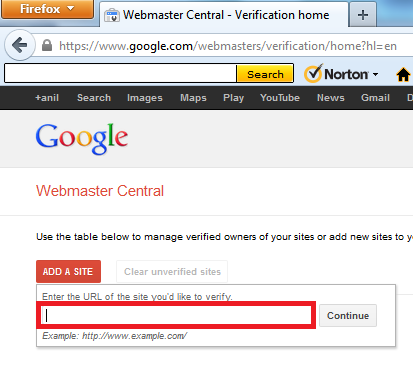
a. Login to Google webmaster tool.
b. Click on “Add Site”
c. Type your site or blog URL incloding http:// in the box appeared.
d. Click “continue” to go to the “site Verification” Page.
e. All the options of site verification will be listed, choose one.
b. Click on “Add Site”
c. Type your site or blog URL incloding http:// in the box appeared.
d. Click “continue” to go to the “site Verification” Page.
e. All the options of site verification will be listed, choose one.
About HTML Tag
You will receive a tag like one given below. You will have ti paste it in the <head> section of your
html file. The string in red will change every time -
<html>
<head>
<meta name="google-site-verification" content="vaDxDI5oIA2R4e_bOl5T39GJrop-AgEo6UyNLBssTa8" />
<title> My title </title>
</head>
<body>
page contents
</body>
<title> My title </title>
</head>
<body>
page contents
</body>
It is easy, copy and paste the above code in your HTML file, save it and go back to the Google webmaster tool and click to verify. During your process of editing the HTML document, the Google webmaster tool site must be kept open.
Tuesday, April 29, 2014
Blog from your Desktop using Blogilo
I was giving KDE4 a trial on my Arch installation when I bumped on a very very cool opensource application – Blogilo. It lets you blog right from your Desktop ie you can compose the blog offline and publish/save the post on the blog server later on. It supports WordPress, Blogger etc and so is handy for most bloggers over there. Actually I am publishing this post from Blogilo !! ;)

Adding Blogs
You can get started by adding your blogs. You can do so at Settings > Configure Blogilo > Blogs. Say you have to add your wordpress blog, fill the url field with “wordpress.com” and fill out your username and password. Then click auto configure and bazzingaa you have your blog configured. Click OK and then you will see your posts displayed in the right panel. Rest of it is just straight forward. Edit your post and click “submit”. It has an option to save draft or to publish straight away !! The same applies for blogger and other supported APIs (listed in the Advanced tab of the Blogs menu).

Composing Blogs
Blogilo features a visual editor, an HTML Editor and a preview tab. All standard text and multimedia formatting is available in the editor interface. Blogilo even imports saved categories and you can select categories from the right panel. Post options like summary and editing permalink is also available. Multimedia inserted is uploaded onto blog servers and named metuculously (which I am very impressed with).
Installation
Blogilo is available in the repositories of most Linux distributions. A windows edition is also available. Visit http://blogilo.gnufolks.org/download/ and start blogging quicker and more efficiently !!
Subscribe to:
Posts (Atom)