Showing posts with label useful. Show all posts
Showing posts with label useful. Show all posts
Thursday, September 25, 2014
Google Chrome Useful add on– Hola Have you tried it
Google Chrome-Useful add on– Hola-Have you tried it
In a large number of countries where there is no freedom or a limited freedom of expression, where there is a type of govt. other than democracy, a dictatorship or a monarchy the administration tries it’s best to support the media(Print or electronic), tries its best to curb the public’s access to internet. Even in some big business houses some sites are blocked for administrative reasons. In this process they block a number of web sites. For example the sites like Pandora, Netflix, hulu are limited to US only, Facebook is blocked in many countries, Twitter is blocked in many countries, China has blocked the largest number of sites even a site like Wikipedia is blocked in china. This is a hopeless situation when a site on which you had a number of friend, followers and you were following a number of friends is blocked.

Image Curtsey-hola.org
An easy to use add-on in Google Chrome may prove very helpful in this situation and lets you get access to such blocked sites. In fact It works like a VPN service hiding technical information from the end user. Access to the blocked sites can easily restored by just clicking the hola icon and it requires no configuration. You can use hola to hide your IP address also.

Thursday, September 4, 2014
Doro PDF Writer a very useful free software to convert files to PDF
Doro PDF Writer-a very useful free software to convert files to PDF
Doro PDF Writer is a very useful software for the people who frequently need to convert their files to PDF format. The software is easy to use and available free to download from the website “the sz development” You can convert any file or text in PDF format easily with the help of this software. This software does not create any desktop icon but adds an extra option in the print dialogue box. This software does not effect the colour of the text but keeps original colour during the process of conversion. If your document is in multiple colours and also contains some colour photographs or colour images, it will keep their original colours as they are. It also provides the option of password protection to secure your document. This software occupies only 8 MB of space on your hard drive. The conversion process is very simple –
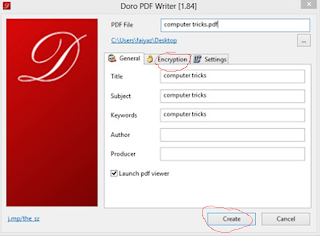
2. Press Ctrl+p to open print menu.
3. Click Print in print options
4. Click to open the printer selection dropdown box. Here you will find option namely “Doro PDF Writer”, click it.
5. Click the “print” button at bottom.
6. Now another screen will appear asking the “Title”, “subject” etc. of the new PDF document to be created. Fill these particulars and if you want to create a password protected document click “Encryption” and fill your password. In appropriate box.
7. Now click “Create” and your document will be converted to PDF format within few moments.
Download the software from here
Sunday, May 4, 2014
Useful Google Operators
Google has several operators that can help you find specific information, specific websites or inquire about the indexing of your own site, below you will find the most important ones:

define: – This operator will find definitions for a certain term or word over the Internet. Very useful when you come across a strange word when writing a post. (i.e. define:trackback).
info: – The info operator will list the sets of information that Google has from a specific website (i.e. info:www.yoursite.com)
site: – This operator can be used to see the number of indexed pages on your site (i.e. site:www.yoursite.com). Alternative it can also be used to search for information inside a specific site or class of sites. (i.e. “blog site:.org” will search for the term “blog” inside all the sites with a .org extension).
link: – The link operator allows you to find backlinks pointing to your site. Unfortunately the count is not updated frequently and not all backlinks are shown (arguably because Google does not want to reveal details about its search algorithm).
allinurl: – Using this operator will limit the search to results that contain the desired keywords on the URL structure. (i.e. allinurl:dailyblogtips)
fileformat: – Useful operator for findind specific file formats. Sometimes you know that the information you are looking for is likely to be contained in a PDF document or on a PowerPoint presentation, for instance. (i.e. “fileformat:.pdf market reseach” will search for PDF documents that contain the terms “market” and “research”)
Subscribe to:
Posts (Atom)